
August 10, 2026
The Grading module of Rootlenses Voice allows you to automatically evaluate calls made by AI voice agents and determine whether each interaction met the criteria defined for a campaign.
Instead of manually reviewing recordings, the system analyzes the outcome of each conversation, identifies relevant events, assigns a score, and determines whether the conditions required to consider an interaction successful were met.
In addition to evaluating call outcomes, Grading allows you to validate the operational behavior of agents, including contact hours, retry rules, and specific conditions for each campaign.
What is Grading?
Grading is an AI-based evaluation system that transforms the results of a call into a structured score.
The system can analyze the summary generated after each conversation and verify whether it contains specific elements or conditions configured in advance.
For example, a sales campaign may require the customer to:
- Show interest in the product.
- Indicate that they have a budget.
- Request additional information.
- Accept a follow-up call.
- Confirm a meeting date.
Each of these events can be configured as an evaluation criterion and contribute to the final call result.
In this way, Grading can automatically answer questions such as:
Did the customer show interest?
Did they request follow-up?
Did the call meet the conversion criteria?
Did the agent follow the rules established for the campaign?
Components of the Grading module
1. Custom Labels
Custom labels allow you to define the events or behaviors that are relevant to a campaign.
Each label represents a condition that the system must identify during the evaluation of a call.
Some examples include:
- Interested customer
- Requested information
- Mentioned budget
- Accepted follow-up
- Scheduled a meeting
- Not interested
- Requested a callback
Each label can have a specific weight within the final score.
When a call ends, Grading analyzes the conversation and determines which labels are met.
The result is used to generate a score that makes it possible to quickly identify the level of interest or success of each interaction.
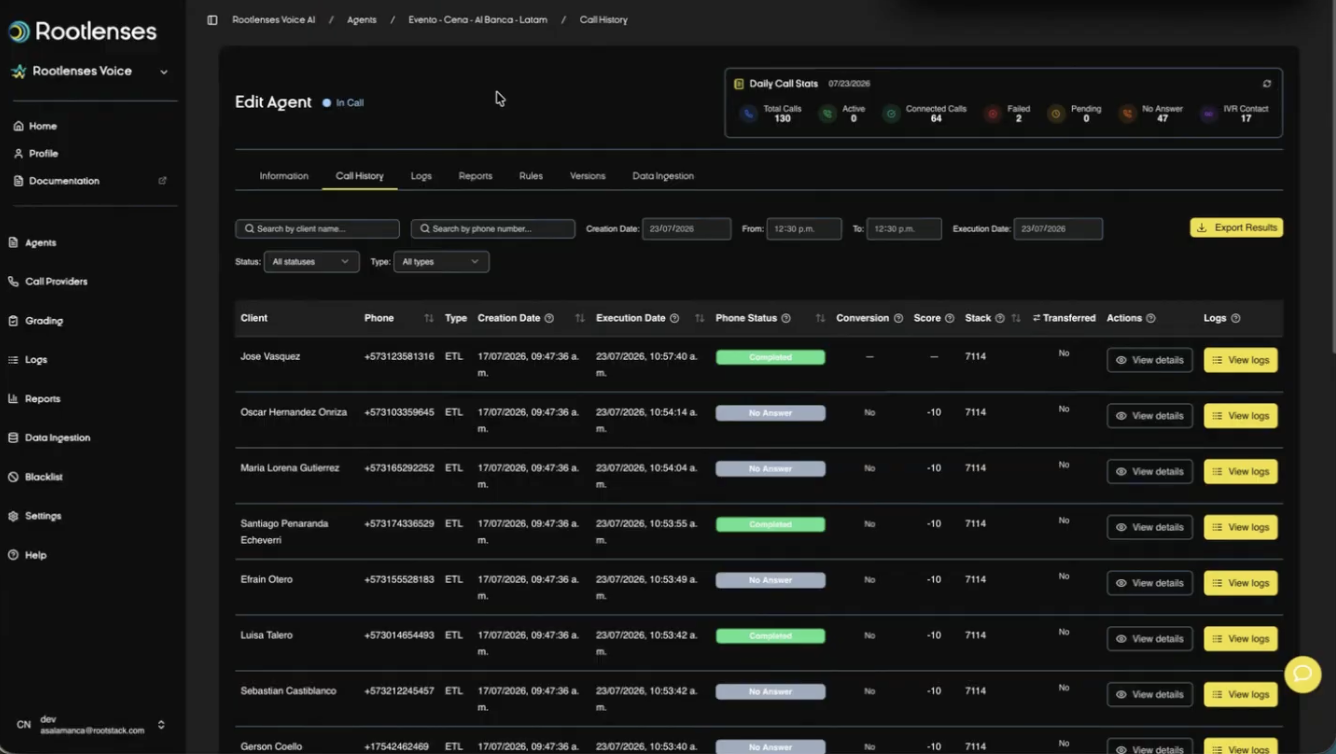
2. Conversion rules
Conversion rules allow you to establish which combination of conditions must be met for a call to be considered a successful conversion.
These rules can use logical operators such as:
- AND: all conditions must be met.
- OR: at least one of the conditions must be met.
Example with AND
A conversion may require:
Customer interested AND accepted follow-up
In this case, the call will only be considered a conversion if both conditions are present.
Example with OR
A campaign may consider the following as a positive outcome:
Scheduled a meeting OR requested information
This allows you to adapt the definition of success to the specific objectives of each campaign.
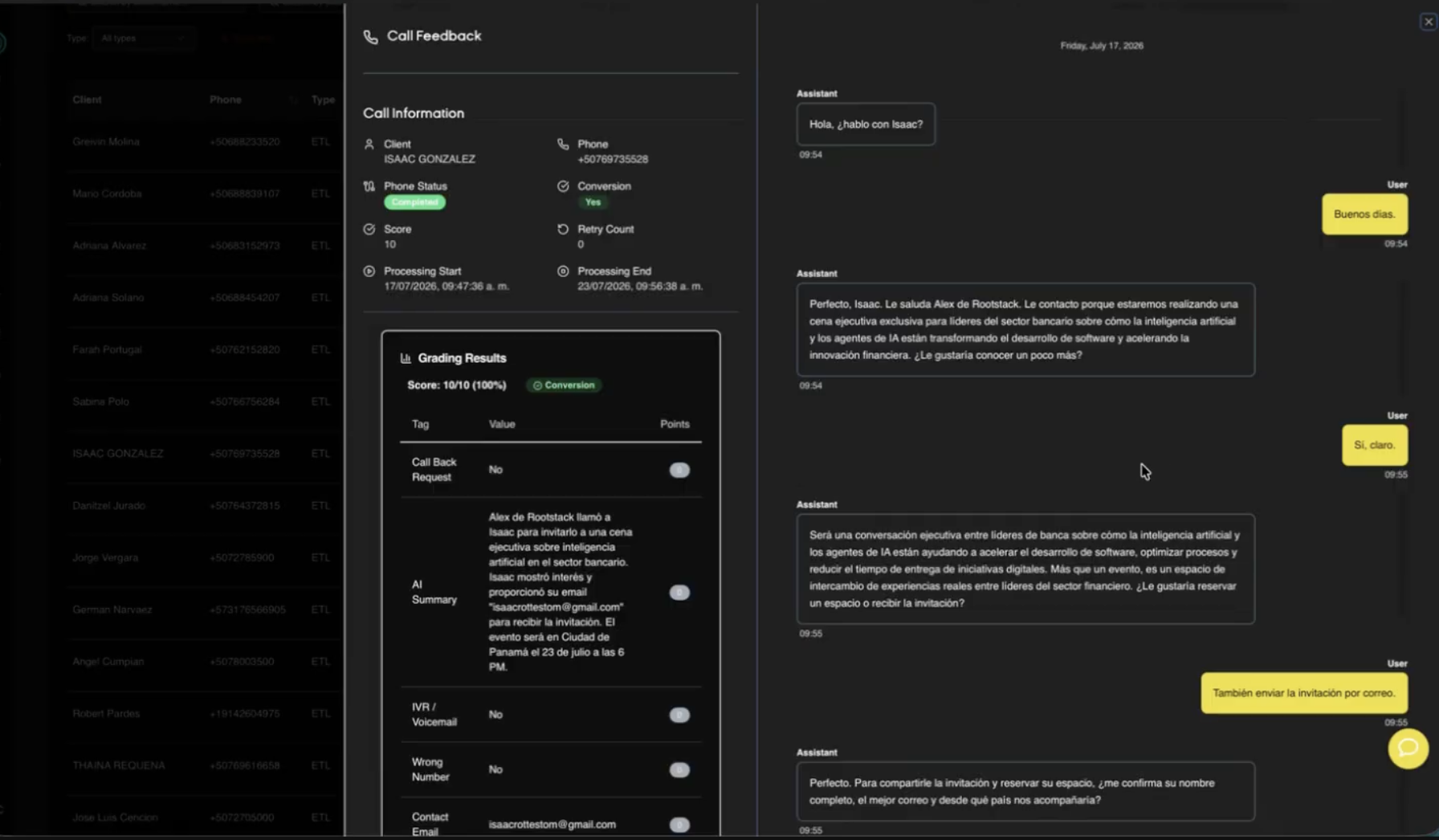
3. Call summary evaluation
One of the main functions of Grading is to evaluate the summary generated after the conversation.
The system can verify whether the summary contains the fields or elements required for a specific score.
For example, a campaign may define that the outcome must identify:
- Customer interest level.
- Budget.
- Identified need.
- Next step.
- Follow-up date.
- Conversation outcome.
Grading uses these criteria to determine whether the call meets the established conditions.
This makes it possible to transform unstructured conversations into information that can be used to automatically measure campaign performance.
4. Historical regrading
Evaluation criteria can change over time.
For example, a company may begin a campaign by considering any customer who requests information as a conversion. Later, it may decide that a conversion should only be counted when the customer also accepts a follow-up.
With Historical Regrading, previously completed calls can be processed again using the new Grading profile.
This allows you to:
- Compare results using different criteria.
- Analyze historical campaigns.
- Identify opportunities that were not previously classified.
- Validate the impact of new conversion criteria.
- Maintain consistency in campaign evaluation.
5. Test before activation
Before applying a Grading configuration to real calls, it is possible to test the configured rules using simulated conversations.
This stage allows you to validate that:
- Labels are detected correctly.
- AND/OR rules produce the expected result.
- Conversion criteria are correctly defined.
- The system assigns the corresponding score.
- There are no contradictory conditions.
Pre-launch testing reduces the risk of activating an incorrect configuration in a production campaign.
COT Grading
Evaluate the script before making calls
COT Grading allows you to evaluate the quality of the Chain of Thought (COT) configured for an agent before it begins making calls.
The system analyzes the flow structure, identifies potential issues, and generates an AI-based evaluation.
The result includes:
- Quality score.
- Errors.
- Warnings.
- Improvement suggestions.
This way, the flow can be validated before being used in a real campaign.
Detailed score
COT Grading generates a quality percentage for the COT and breaks down the result into different categories.
Errors
Issues that may directly affect the expected operation of the agent.
Warnings
Situations that do not necessarily prevent execution but may generate unexpected behavior or affect the quality of the flow.
Suggestions
Recommendations to improve the structure, logic, or behavior of the agent.
Each category can be expanded to view the details of the findings identified by the system.
Visual node editor
The COT can be visualized through a node-based visual editor.
This editor represents the flow as a map of states and transitions, making it possible to visualize how the agent should behave during a conversation.
The editor makes it easier to:
- Identify the node where an issue occurs.
- Understand transitions between states.
- Navigate directly to the point that requires attention.
- Review the flow logic without having to search through the code manually.
This is especially useful for complex flows with multiple scenarios and conversation paths.
Automatic correction
When COT Grading identifies an error or warning, the system can provide an "Apply" action.
This function allows the suggested correction to be directly implemented on the COT.
The goal is to reduce the manual work required to review and correct agent flows.
The user can:
- Run the evaluation.
- Review errors and warnings.
- Review the recommendation.
- Select Apply.
- Re-evaluate the COT.
This process facilitates rapid iteration between evaluation and correction.
COT templates
COTs that have demonstrated successful performance can be saved as reusable templates.
Templates help accelerate the configuration of new agents and campaigns.
Some examples of use cases include:
- Collections.
- Sales.
- Scheduling.
- Reservations.
- Sales follow-up.
The platform can also include pre-designed templates that can be used as a starting point for configuring new flows.
Operational rule compliance
Grading can also be used as part of the validation of compliance with the operational rules defined for a campaign.
These rules determine how, when, and under what conditions an agent can make calls.
Time restrictions
Agents can be configured to make calls only within specific hours.
For example:
Monday through Friday, from 8:00 a.m. to 6:00 p.m.
Under this configuration, the system must avoid calls:
- Before 8:00 a.m.
- After 6:00 p.m.
- During Saturdays and Sundays.
These restrictions allow the operation to be adapted to the company's internal policies and the contact hours defined for each campaign.
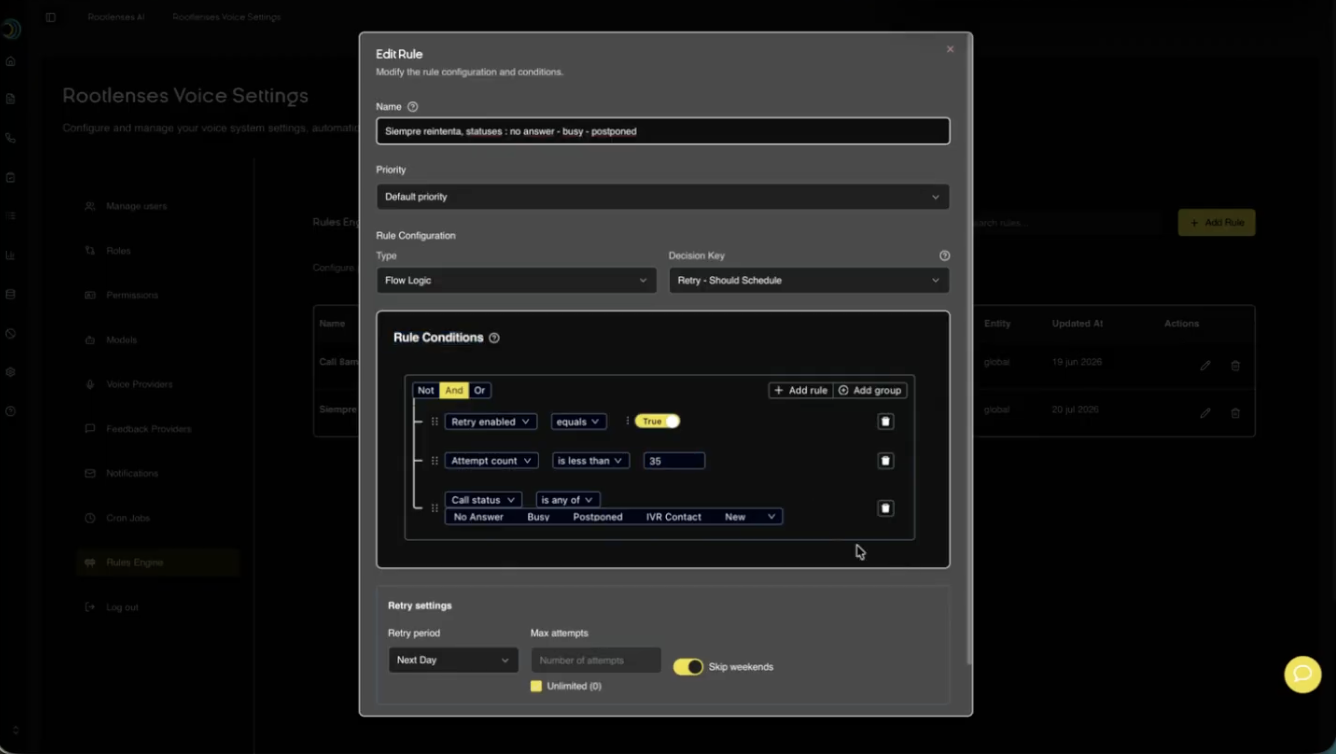
Retry rules
Campaigns can establish specific rules to determine when and how to make new contact attempts.
For example, a campaign can define:
- Maximum number of retries.
- Interval between retries.
- Allowed hours for calling again.
- Conditions that allow a new attempt.
- Conditions that block future attempts.
Example
If a customer has already answered a call within a campaign, the agent can be configured to not automatically call that contact again within the same campaign, regardless of whether the conversation ended successfully or not.
This way, the system prevents duplicate and unnecessary contacts.
Evaluation flow
The operation of the module can be summarized in the following process:
1. Configure criteria
Define the labels, weights, and conditions that determine the success of a call.
↓
2. Configure rules
Establish conversion rules, schedules, and retry conditions.
↓
3. Test the configuration
Use simulated conversations to validate the expected behavior.
↓
4. Run the campaign
Agents make calls while following the configured rules.
↓
5. Analyze the conversation
The system processes the result and summary of each call.
↓
6. Apply Grading
The configured labels and rules determine the interaction score.
↓
7. Identify conversions
The system determines whether the call meets the conditions defined as a conversion.
↓
8. Regrade when necessary
Historical calls can be evaluated again using new criteria.
Benefits of the Grading module
Grading transforms call analysis into an automated, structured, and measurable process.
Its main benefits include:
- Automated evaluation: reduces the need to manually review recordings.
- Custom criteria: each campaign can define what a successful interaction means.
- Measurable results: conversations are converted into scores and labels.
- Greater consistency: all calls are evaluated using the same criteria.
- Operational control: allows you to establish schedule and retry rules.
- Continuous optimization: allows historical conversations to be regraded.
- Pre-launch validation: criteria can be tested before activating a campaign.
- Agent improvement: COT Grading helps identify issues in flows before real calls are made.
- Reusability: successful COTs can be converted into templates for new campaigns.
Conclusion
The Grading module of Rootlenses Voice provides an evaluation and control layer for conversations conducted by AI voice agents.
Its function is not limited to assigning a score to a call. It allows you to define which behaviors represent success, establish conversion rules, automatically evaluate results, control the operational conditions of campaigns, and improve agent flows before putting them into production.
With Grading and COT Grading, companies can move beyond simply automating calls to systematically measuring, validating, and optimizing the performance of every interaction and every agent.


