
October 12, 2026
Artificial intelligence makes it possible to analyze Excel and CSV files without writing code, using complex formulas, or having advanced data analysis skills. With AI-powered data analysis tools, users can upload files, ask questions in natural language, identify trends, and obtain results that support business decision-making.
For companies working with sales reports, inventory, financial information, or customer databases, this technology offers a way to reduce manual work and make better use of available information.
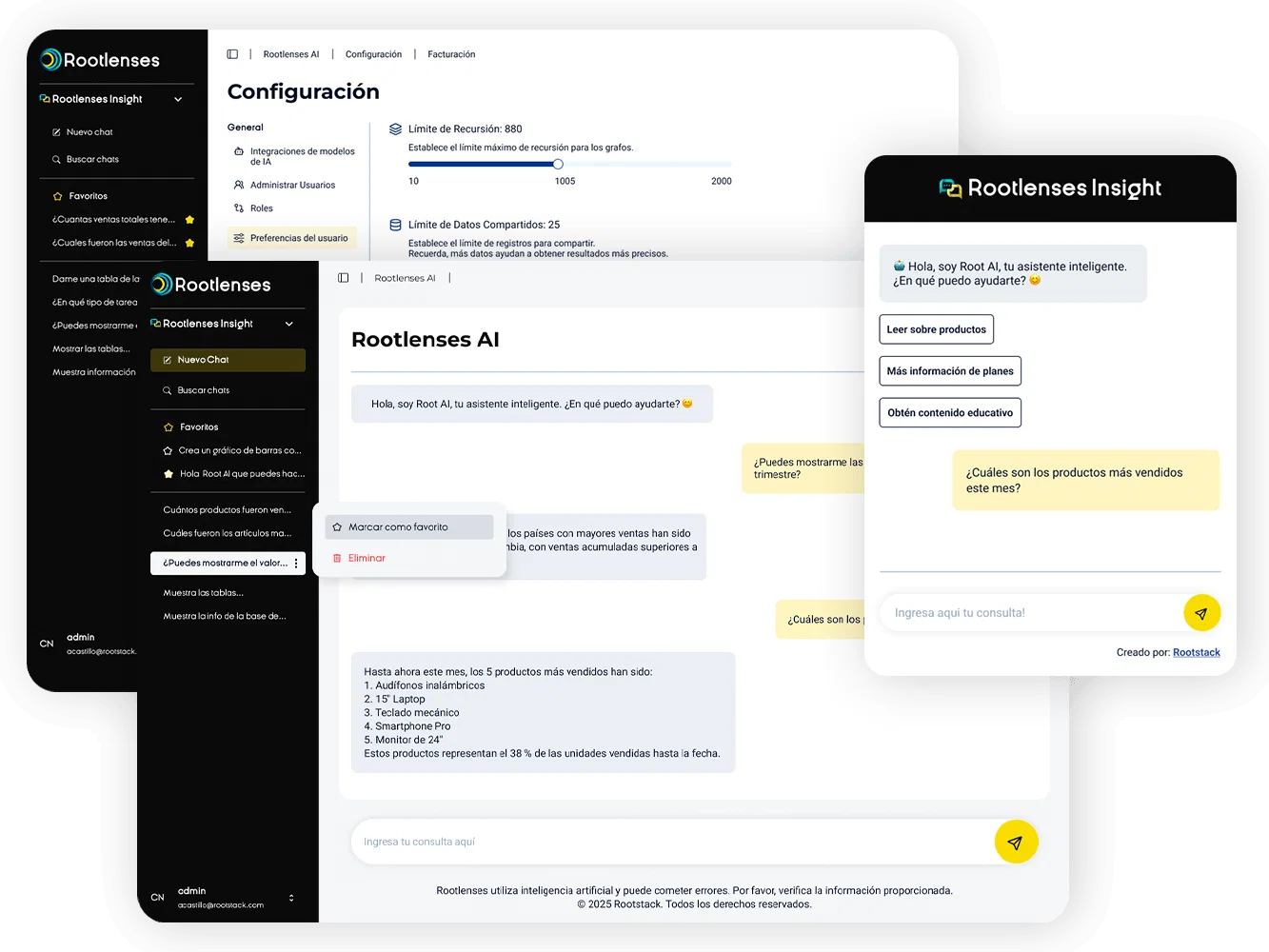
Rootlenses Insight is an AI-powered data analysis solution that allows users to query business information using natural language, without having to write SQL queries. Its goal is to make data more accessible and help teams turn it into useful business insights.
What Is an AI Tool for Analyzing Excel and CSV Files?
An artificial intelligence tool for analyzing Excel and CSV files can interpret structured data, answer questions about its contents, and generate results that help users understand what is happening in a business.
Excel is widely used to organize information in spreadsheets, while CSV (Comma-Separated Values) is a text format that stores tabular data and facilitates its exchange between applications.
Traditionally, analyzing these files requires knowledge of formulas, pivot tables, filters, or visualization tools. With artificial intelligence, part of this process can be performed through instructions written in natural language.
For example, instead of building a formula to compare sales across different periods, a user can ask: Which products generated the most revenue during the last quarter?
The tool interprets the request, analyzes the available data, and provides an answer based on the information in the file, depending on the capabilities of the solution being used.

How to Analyze Excel and CSV Files with AI Step by Step
The process depends on the tool you choose, but it generally follows five steps.
1. Prepare and Upload Your File
Select the Excel (.xlsx or .xls) or CSV file containing the information you want to analyze. Before getting started, make sure the headers are clear, dates follow a consistent format, and the columns contain the expected data types.
Removing duplicates, checking for missing values, and correcting inconsistencies improves the quality of the analysis.
2. Ask Questions in Natural Language
One of the main advantages of AI is that it allows users to query data without knowing programming languages.
Instead of manually configuring an analysis, you can ask questions such as:
- Which were the five best-selling products?
- Which months recorded a decline in revenue?
- Which categories have the lowest profit margins?
- Are there any duplicate records or outliers?
- Which branches experienced the highest growth?
The more specific the question, the easier it is to obtain a useful result and verify it.
3. Identify Patterns and Trends
Artificial intelligence can help uncover relationships between variables, compare periods, and identify patterns that may not be obvious when manually reviewing large tables.
For example, a sales team can investigate whether sales decline during certain seasons or whether specific products behave differently across regions.
Results should be interpreted in light of data quality and the business context. A correlation between two variables does not, by itself, prove that one causes the other.
4. Request Tables, Summaries, and Visualizations
Depending on the tool, you can request that results be presented as tables, charts, or executive summaries.
This makes it easier to share findings with other departments and communicate complex information in an understandable way to people who do not work directly with data.
5. Validate Results Before Making Decisions
AI can make mistakes when interpreting columns, dates, calculations, or ambiguous instructions. Therefore, it is important to check results against the original data, review the filters applied, and validate relevant calculations.
For high-impact financial, commercial, or operational decisions, human review remains essential.

Which Tool Should You Choose to Analyze Excel and CSV Files Without Coding?
Different AI-powered data analysis solutions are available. The right choice depends on the file type, the complexity of the analysis, collaboration needs, and privacy requirements.
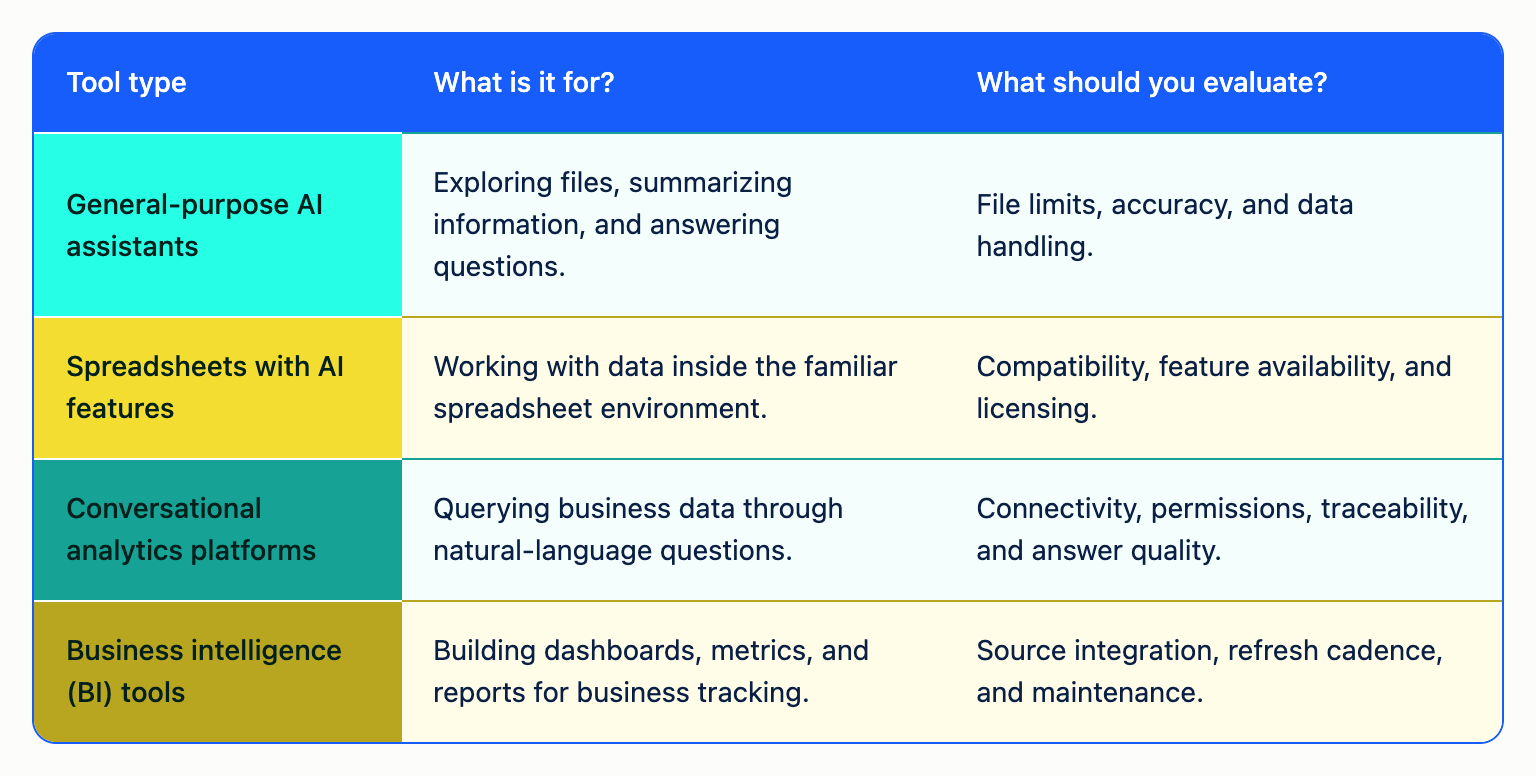
Not all tools support the same formats, file sizes, or types of analysis. Some are designed to work with individual files, while others allow users to query information connected to multiple business data sources.
Before choosing a solution, also check how data is processed, where it is stored, and what controls are in place to protect confidential information.
Rootlenses Insight: Analyze Business Data with Artificial Intelligence
Rootlenses Insight is an AI-powered data analysis solution that allows users to query business information using natural language, without having to write SQL code.
Instead of relying exclusively on technical queries or requests to the data team, users can ask questions about available information and obtain answers that make it easier to interpret.
The solution is designed for companies looking to simplify data access and help their teams make informed decisions.
Its main applications include:
- Data analysis: Explore business data and obtain answers to specific questions.
- Trend identification: Understand variations in business indicators and results.
- Access to information without SQL: Query data using natural language.
- Decision-making support: Turn operational questions into useful analyses for teams.
- Greater autonomy: Make it easier for users across different departments to access information without advanced programming skills.
Unlike a tool focused solely on generating formulas, the value of conversational analytics lies in making it easier to interact with data. The usefulness of the results depends on the connected data sources, information quality, and implementation capabilities.
If your company needs to go beyond manual spreadsheet analysis, explore Rootlenses Insight to discover how artificial intelligence can simplify access to business information.
Is It Safe to Analyze Excel and CSV Files with Artificial Intelligence?
Security depends on the tool and how it is implemented. Before uploading business information to an AI platform, it is important to review its privacy, storage, data retention, and access control policies.
To use these solutions responsibly, consider the following recommendations:
- Do not upload personal, financial, or confidential data without authorization.
- Check whether the platform uses your information to train models.
- Evaluate access controls and how permissions are separated between users.
- Check where files are processed and stored.
- Consider solutions that allow processing to remain within infrastructure controlled by your organization when security policies require it.
- Validate results before using them to make critical decisions.
In business environments, ease of use must go hand in hand with security controls, governance, and oversight.
Frequently Asked Questions About AI for Analyzing Excel and CSV Files
Can I Analyze Excel Files with Artificial Intelligence Without Knowing How to Code?
Yes. Some tools allow users to upload spreadsheets and ask questions in natural language to summarize data, compare results, and identify trends without writing code.
Can CSV Files Be Analyzed with AI?
Yes. Many tools support CSV files and allow users to explore their rows and columns, calculate metrics, and identify patterns. Compatibility and file size limits depend on each platform.
Do I Need to Know SQL to Analyze Data with Artificial Intelligence?
Not necessarily. Conversational analytics tools allow users to query information using natural language. However, understanding basic concepts such as percentages, averages, and data quality helps users validate results.
Can Artificial Intelligence Create Charts from Excel Files?
Yes. Some tools can generate charts and tables from data. The available visualizations depend on the platform and the structure of the file.
What Types of Companies Can Benefit from AI-Powered Data Analysis?
Companies in retail, banking, healthcare, logistics, services, and other industries can use these tools to analyze sales, inventory, operations, financial indicators, and customer behavior, provided they have suitable data and appropriate security controls.
What Is the Difference Between Analyzing a File with AI and Using a Business Analytics Platform?
Analyzing a file usually focuses on a specific dataset. A business analytics platform may offer additional capabilities, such as connections to multiple data sources, controlled access, recurring queries, and analysis shared across teams. Specific features depend on each solution.
Turn Your Spreadsheets into Useful Business Insights
Analyzing Excel and CSV files with artificial intelligence helps reduce manual tasks, explore data through simple questions, and uncover relevant information for business operations.
However, getting value from this technology requires more than automatically generating answers: it is essential to have reliable data, ask good questions, and verify the results.
Rootlenses Insight simplifies business data analysis through natural language, helping teams query their data without relying on advanced programming skills.


